
Explore Productsended
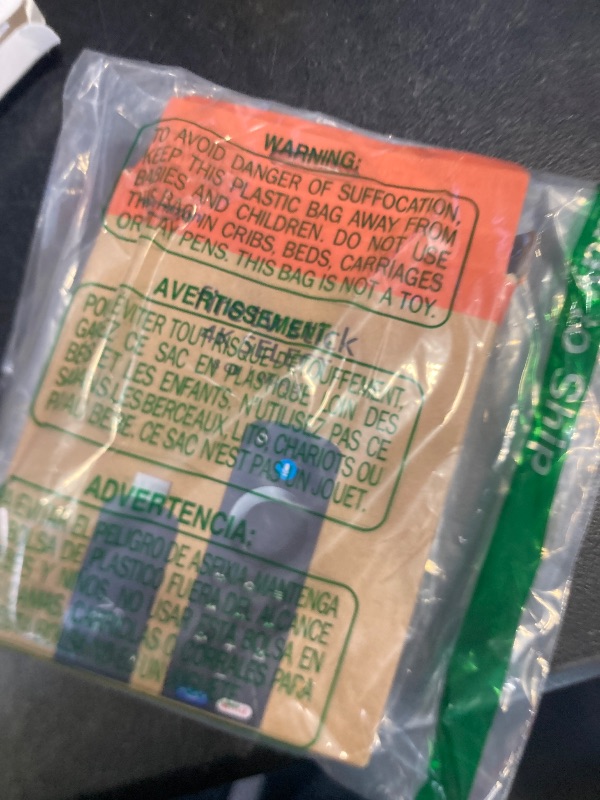
TGHCP Voice Firestick Remote Fit for Fire-Smart TV Stick & Cube, TV Stick 4K, TV Stick Lite, TV Stick (2nd Gen), TVs Cube (1st & 2nd Gen), Smart TVs (3rd Gen), Fit for Hisense, TCL Smart TV
TGHCP Voice Firestick Remote Fit for Fire-Smart TV Stick & Cube, TV Stick 4K, TV Stick Lite, TV Stick (2nd Gen), TVs Cube (1st & 2nd Gen), Smart TVs (3rd Gen), Fit for Hisense, TCL Smart TV

Item Details
Seller

Legacy Bids
Pickup Location
3591 John Peter Lee St
North Las Vegas, NV, 89032
Quality
New
Functional
No Damage
No Assembly Needed
In Package
No Missing Parts
Estimated Retail Price
$8.71
Buyers Premium
15%
Inventory Number
1073710034
Found in
Additional Details from the Manufacturer
This item information is coming from the manufacturer. Some of the details may vary from the Nellis Auction listing. Please check the Quality Rating and Notes for information specific to this listing
brand
TGHCPcolor
2nd GEN(L5B83H)More features
- Compatible with: Smart TVs Stick Lite, Smart TVs Stick 2020 Release, Smart TVs Stick (2nd Gen), Smart TVs Stick 4K, Smart TVs Cube (2nd Gen), Smart TVs Cube (1st Gen), and AMZ Smart TVs (3rd Gen), Not for Roku, Not for Samsung
- Not Compatible: This remote control can not compatible with Smart TVs 1st Gen, Smart TVs 2nd Gen, Smart TVs Stick (1st Gen), or Smart TVs Edition smart TVs, Before placing an order, please make sure your device model is fit our remote, if your product doesn't work, please send your message to us, we must give you the best solution in the end
- With Voice Function: You can use the voice function to find your favorite content, to easily find, launch, and control content, play music, view sports scores, check the weather, see live camera feeds, and control compatible smart home devices. Quickly jump to your favorite scenes with standard navigation and playback controls
- How to Pair:First you need to remove stick from TV and power from stick. Then reattach power and stick back in TV. Then Press the Home button about 10-15 seconds until the LED indicator starts to rapidly flash amber for 10 seconds, then your remote will automatically pair with your device
- Attention:1:Make sure your old remote's batteries are removed before pair,if the old remote is still pairing,the new one can not be used, 2:Please confirm your remote whether connected more than 6 limits, 3:Before placing an order, please make sure your device model is fit our remote
Online Reviews
4.5/5
Based on 411 ratings
This score is based on 411 recent reviews from online retailers.
Be sure to check our Quality Rating and Notes above for more details on this listing.
See the deals
Get in on the action, thousands of new items added daily. Bid and win!
Start bidding now