
Explore Productsended
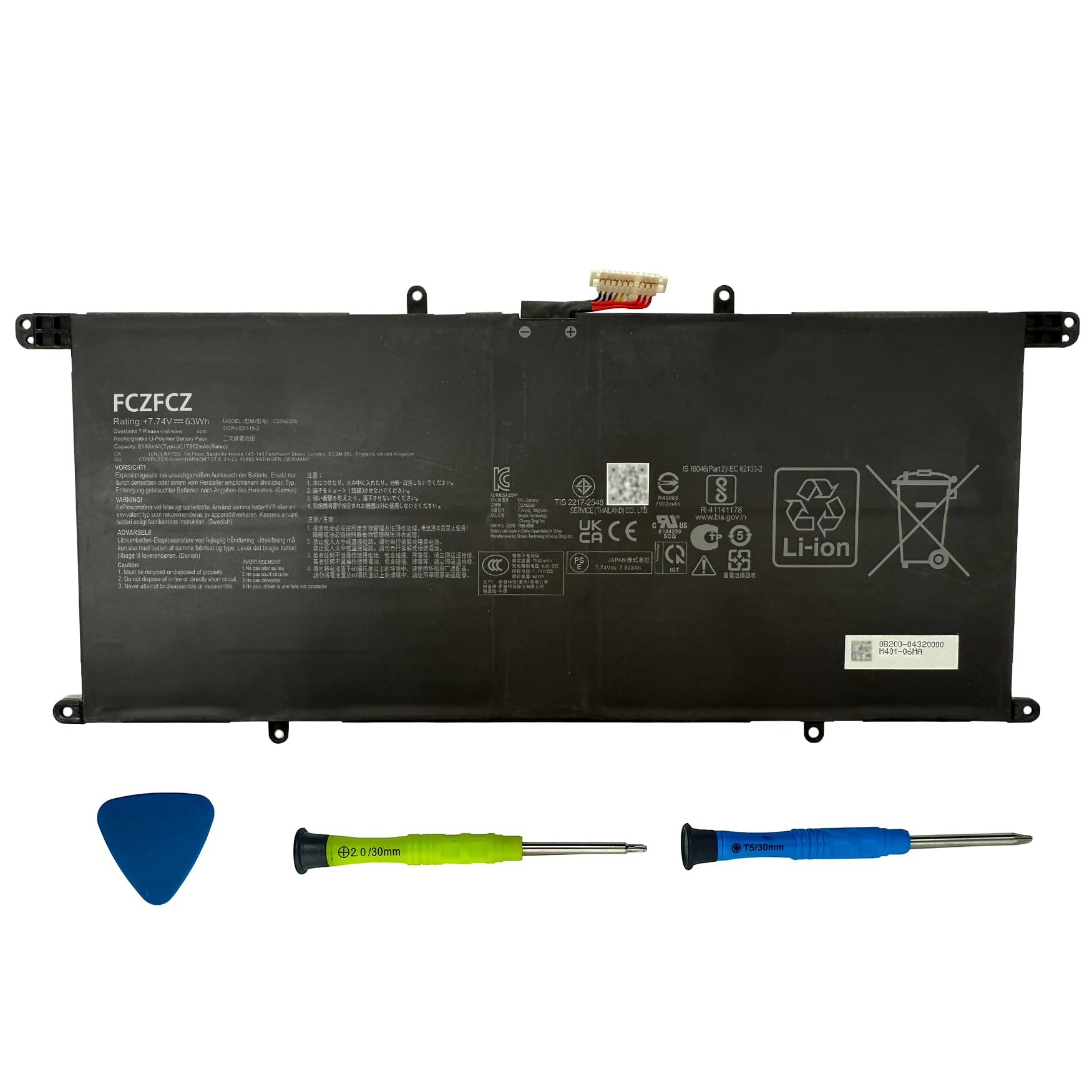
FCZFCZ C22N2206 Laptop Battery 63Wh 8140mAh Replacement for Asus ZenBook S 13 OLED / UX5304 UX5304VA UX5304MA Series 0B200-04320000 2ICP4/53/115-2 7.74V 4-Cell
FCZFCZ C22N2206 Laptop Battery 63Wh 8140mAh Replacement for Asus ZenBook S 13 OLED / UX5304 UX5304VA UX5304MA Series 0B200-04320000 2ICP4/53/115-2 7.74V 4-Cell
Item Details
Seller

Nellis Auction
Pickup Location
4031 Market Center Dr Suite 303
North Las Vegas, NV, 89030
Quality
New
Functional
No Damage
No Assembly Needed
In Package
No Missing Parts
Estimated Retail Price
$114.09
Buyers Premium
15%
Inventory Number
1069452636
Additional Details from the Manufacturer
This item information is coming from the manufacturer. Some of the details may vary from the Nellis Auction listing. Please check the Quality Rating and Notes for information specific to this listing
brand
FCZFCZMore features
- 【Specifications】Battery Model:C22N2206 // Voltage:7.74V // Capacity:63Wh 8140mAh 4-cell // Color:Black // Condition:Brand New.
- 【Replacement for Part Number】C22N2206 0B200-04320000 2ICP4/53/115-2
- 【Compatible with Machine Models】for Asus ZenBook S 13 OLED UX5304 Series; for Asus ZenBook S 13 OLED UX5304MA Series; for Asus ZenBook S 13 OLED UX5304VA Series: UX5304VA-NQ322W UX5304VA-NQ323W UX5304VA-NQ185X UX5304VA-NQ117W UX5304VA-NQ015W UX5304VA-NQ038W UX5304VA-NQ111W UX5304VA-NQ018W UX5304VA-NQ075W UX5304VA-NQ021W UX5304VA-NQ010W UX5304VA-NQ039W UX5304VA-XS76T
- 【Safety】All FCZFCZ products are Certified by CE, UL for safety. Each battery is factory tested before shipment and at good condition, and have its mark. Built-in circuit protection ensures both safety and stability. Each battery has high capacity to provide enduring, continual use.
- 【Instructions】Please open the back cover of the laptop before purchasing and confirm that the original battery type is the same as the picture. Please read the battery instruction manual carefully before installing the battery. Please install the battery correctly and ensure that the battery interface and the motherboard are firmly connected. Please use the original charger to charge the laptop. After battery installation, discharge the new battery to 5% (not 0%), then charge and cycle 3-4 times to wake up the new battery.

See the deals
Get in on the action, thousands of new items added daily. Bid and win!
Start bidding now