
AURSINC MMDVM Duplex Hotspot Module Dual Hat V1.5.2 with 0.96 OLED Display Support P25 DMR YSF NXDN DMR Slot 1 + Slot 2 for Raspberry Pi, Pi Zero (with OLED)
AURSINC MMDVM Duplex Hotspot Module Dual Hat V1.5.2 with 0.96 OLED Display Support P25 DMR YSF NXDN DMR Slot 1 + Slot 2 for Raspberry Pi, Pi Zero (with OLED)
Description
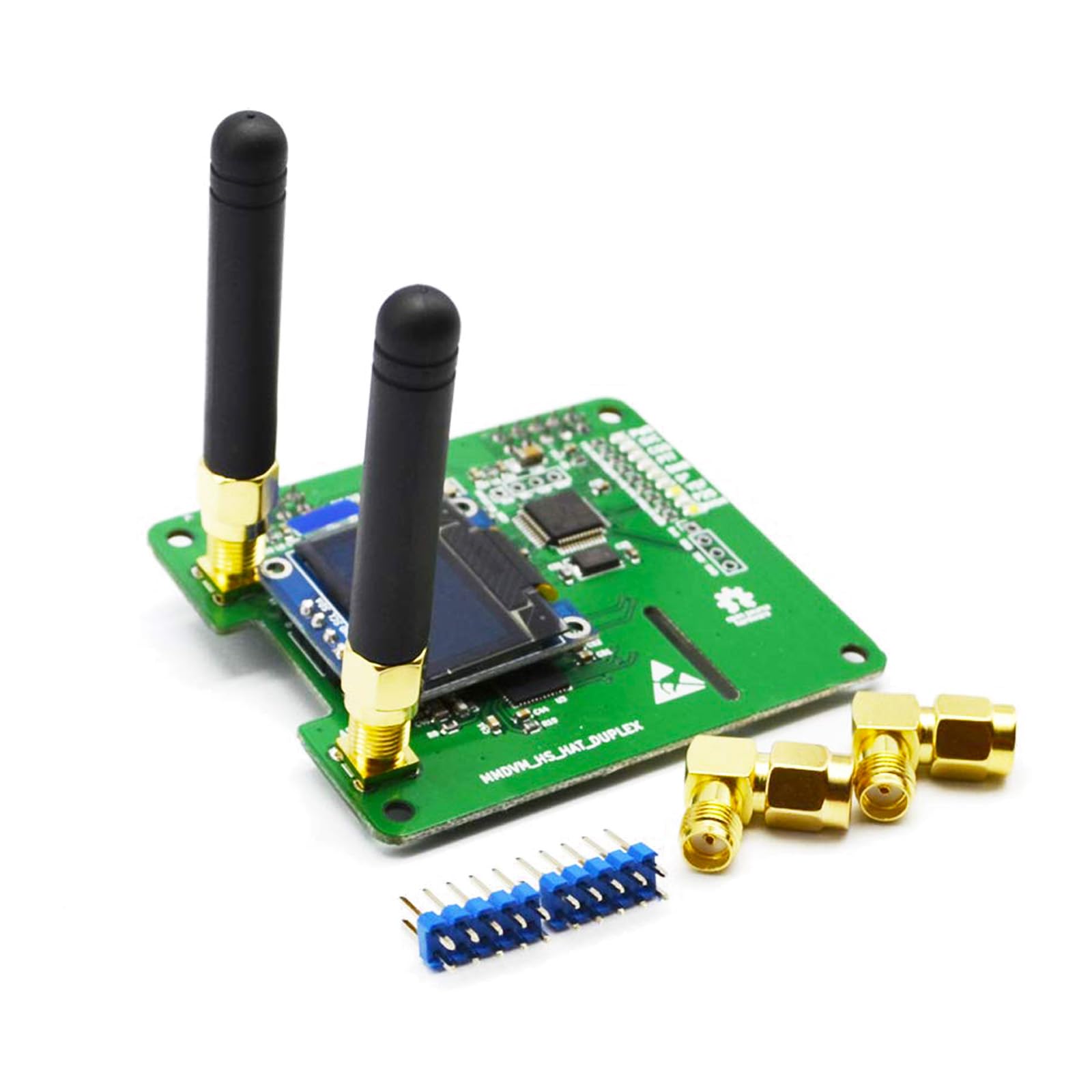
DESCRIPTION Original cystal : Original ECS-TXO-3225-147.4-TR from USA Duplex variant of MMDVM_HS_Hat This PCB uses the MMDVM_HS . It has two ADF7021 onboard and allows for duplex operation with two time slots on DMR. Setting Tips: Modem select: STM32_HS_GPIO FREQUENCY: UHF 433-900MHz, VHF 144-220 MHz. NOTE: TX =0, RX=0 To leave the screen on all the time In Pi-Star configuration, ensure you have "OLED Type 3" in the display type field at the top of the page, set Port to: modem. Also, in the Expert section, go to MMDVM host, and scroll down to the OLED section. Make sure LogoScreensaver is set to 1. This leaves the screen on all the time. Otherwise, it goes blank when idle Package List: 1x MMDVM duplex HotSPOT Module 2x Antenna 2x SMA socket
Item Details
Seller

Nellis Auction
Pickup Location
7440 Dean Martin Dr Suite 204
Las Vegas, NV, 89139
Quality
Estimated Retail Price
$62.73
Buyers Premium
15%
Inventory Number
1079245645
Additional Details from the Manufacturer
This item information is coming from the manufacturer. Some of the details may vary from the Nellis Auction listing. Please check the Quality Rating and Notes for information specific to this listing
brand
AURSINCcolor
With OLEDdimensions
Package: 0.15 lbMore features
- [Extensive Compatibility] Supports DMR, P-25, D-Star and System Fusion. HIGH PERFORMACE: 32-bit ARM processor, up to 10mW RF power, fully tested every piece. Compatible with the Raspberry Pi, including the Pi 1, 2/2b, 3/3b/3b+, 4/4b, Pi Zero, Pi Zero 2W
- [Easy to Assemble] The firmware is pre-loaded and is easily upgraded via software. Onboard LEDs showing status (Tx, Rx, PTT, Mode). Pi-star control Mode selection: DUPLEX Mode/SIMPLE Mode
- [Frequency Range] UHF 433-900MHz, VHF144-146MHz. (144-148, 219-225, 420-475 Main band, 842-950) It's best to work on the amateur band: 430-440 MHz. NOTE: TX=0, RX=0. To leave the screen on all the time In Pi-Star configuration, ensure you have "OLED Type 3" in the display type field at the top of the page, set Port to: modem
- [Setting] Modify the modem type (any model ending in GPIO can be supported). Radio/Modem Type: STM32-DVM/MMDVM_HS-Raspberry pi Hat(GPIO). In the Expert section, go to MMDVM host, and scroll down to the OLED section. Make sure LogoScreensaver is set to "1", this leaves the screen on all the time. Otherwise, it goes blank when idle
- [Update New FW] (pi-star / expert / ssh access / user: pi-star pass: raspberry) You can directly run upgrade commands without the need to set jumpers (run in the Pi star terminal): sudo pistar-mmdvmhshatflash hs_dual_hat (if this command doesn't work, please try this command: mmdvm.club/index.php/wpsd .html)
Online Reviews
4.4/5
Based on 93 ratings
This score is based on 93 recent reviews from online retailers.
Be sure to check our Quality Rating and Notes above for more details on this listing.

See the deals
Get in on the action, thousands of new items added daily. Bid and win!
Start bidding now